MM2 Aim Trainer Controls
WASD and click on PC, joystick and tap on mobile, sticks on console, plus cursor and code menus.
MM2 Aim Trainer uses ordinary Roblox movement. The skill is not a hidden bind; it is matching look speed to Murder Mystery 2 and keeping a cursor small enough to see dummy heads. Read this after Getting Started so you already joined Aim Trainer 2 or the original 8 June 2021 place. Pair it with How to Play for dummy rows, then Improve Aim for the drill that uses these binds. Seasonal hunts on the same maps still use the same movement; event quests does not add a second control scheme. The Guides Hub indexes the rest.
Servers are size 1. You are not sharing a keyboard with anyone. Optional 1v1 PVP still uses these binds, with one important throw exception noted below.
PC, mobile, and console
| Action | PC | Mobile | Console |
|---|---|---|---|
| Move | WASD | Left joystick | Left stick |
| Look | Mouse | Right-side drag | Right stick |
| Shoot gun | Left click | Fire button / tap | Trigger |
| Jump | Space | Jump button | Face button |
| Sprint (if enabled) | Shift | Sprint control | Sprint bind |
| Throw knife (some 1v1 rules) | E | On-screen throw | Face / interact |
| Open left menus | Mouse on the left tabs | Tap the left tabs | Select the left tabs |
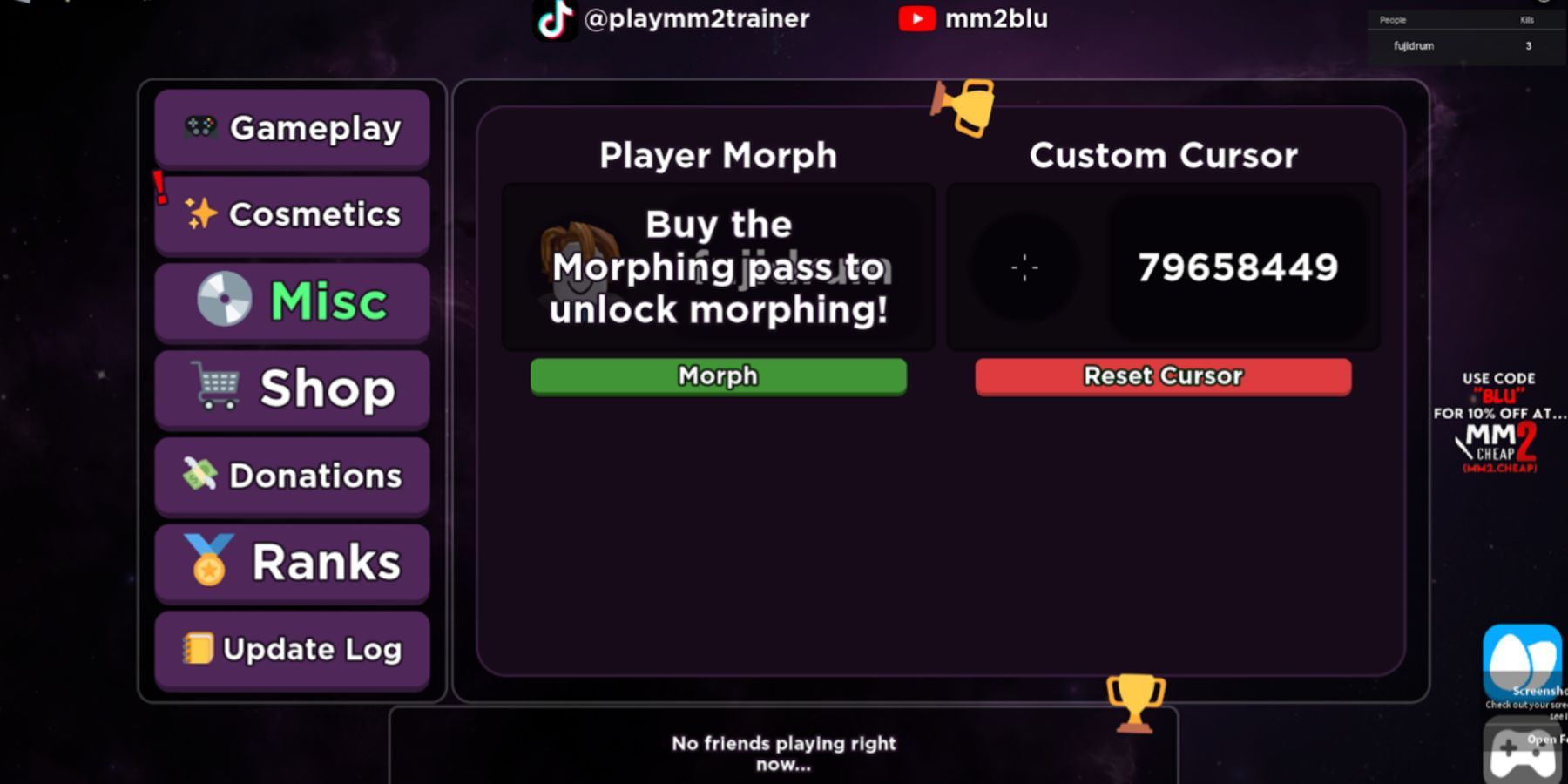
Shoot is click or tap. Do not assume right-click throws the knife. In several 1v1 PVP rules on this trainer, throw is E (or the mobile throw control), and stabbing is not the point of the mode. If a throw does nothing, check the mode before you raise sensitivity. Jump is Space on PC; spam jumper dummies exist to punish people who never jump and people who only jump. Sprint is optional and only matters if you enabled it in Roblox or in the experience. Menus sit on the left: Gameplay, Cosmetics, Misc, Shop, Donations, Ranks, Update Log. You will live in Gameplay and Misc. Shop is for Aim Trainer 2 codes. Donations can wait.
Cursor, codes, and look speed
Custom cursor is a Misc field on the original trainer. You paste a Roblox asset ID, confirm, and the crosshair swaps. That is not a Shop promo code. The working list lives on cursor IDs. Use a red-dot, small scope, or other tiny mark. Pentagram, landscape, turtle, and character cursors look loud in screenshots and hide heads at range. If the ID does nothing, the asset was moderated; pick another ID instead of restarting Roblox five times. How to redeem is the Shop path for promo strings, not for these numbers.
Aim Trainer 2 codes: open Shop, then the three-dot control, paste, submit. The live strings are on codes. Do this on PC with copy-paste. Mobile and console players should paste from the Roblox app clipboard if they can; typing a 10-digit cursor ID on a controller is how people swap to a random decal.
Sensitivity advice that actually transfers:
- Set Roblox camera sensitivity to the same value you use in Murder Mystery 2. The trainer cannot fix a mismatch.
- If you flick past dummy heads, lower look speed slightly and re-run standing still for two minutes.
- If you cannot turn with a spam jumper, raise it slightly. Do not double it.
- Keep the crosshair at head height while you walk. That is placement, not a bind.
- Change one variable at a time. New cursor plus new sensitivity plus new dummy is how people conclude the trainer is broken.
Highlight murderer is a gameplay toggle, not a control bind. Shift sprint, if enabled, will also exist in real MM2, so decide once. Do not enable a trainer-only assist and expect it in Nikilis’s game.
Device-specific traps
PC players over-rely on micro-flicks at high DPI and then queue MM2 on a different Windows pointer speed. Lock pointer speed and Roblox sensitivity before you start the improve aim ladder.
Mobile players lose throws because the fire button and look drag overlap. Park your thumb so a tap cannot also yaw the camera. Joystick sprint plus jump is enough movement; you do not need to recreate PC WASD on a four-inch screen. If the dummy is a chasing exploiter and you are on a phone, you are allowed to drop a tier. The dummy types list is not a dare.
Console players hit two walls: last seasonal collectible on a roof (camera assist fights you), and cursor IDs (no easy paste). For hunts, slow the look stick and walk edges; event quests notes that the last gift is often a camera problem, not a missing spawn. For cursors, paste the ID on a phone logged into the same account or skip decorative IDs entirely and keep the default until you can type it.
Optional 1v1 PVP does not add new movement. It adds rule text. Learn E (or the on-screen throw) before you blame the stick. NPC mode keeps click-to-shoot simple; stay there until How to Play presets are automatic.
Before you queue real MM2 as Sheriff, run this 60-second check: same sensitivity, same cursor size, same gun skin, jump working, menus closed so they do not eat a click. If any fail, you are about to practice a different game than tonight.
Frequently Asked Questions
Quick answers for codes, cursors, dummies, and aim drills.
How do I throw the knife?
In several 1v1 PVP rules it is E (or the mobile throw control), not right-click. NPC gun drills still use click or tap. See How to Play for mode differences.
Where is the custom cursor box?
Misc tab on the original trainer. Paste an ID from cursor IDs. Shop three-dots is for Aim Trainer 2 promo codes, listed on codes.
Should my sensitivity match Murder Mystery 2?
Yes. The trainer only transfers if look speed matches. Adjust after a standing warm-up as described in Improve Aim, not in the middle of an exploiter dummy.
I am on console and cannot redeem a cursor ID.
Paste from a phone on the same Roblox account or skip decorative IDs. Promo codes on Aim Trainer 2 still go through Shop; steps are on how to redeem.
Do menus have extra keybinds?
No. Left-side tabs are clicked or selected. Gameplay holds dummy settings; Misc holds cursor; Shop holds Aim Trainer 2 codes. Learn the tabs in Getting Started.